

1. 概要
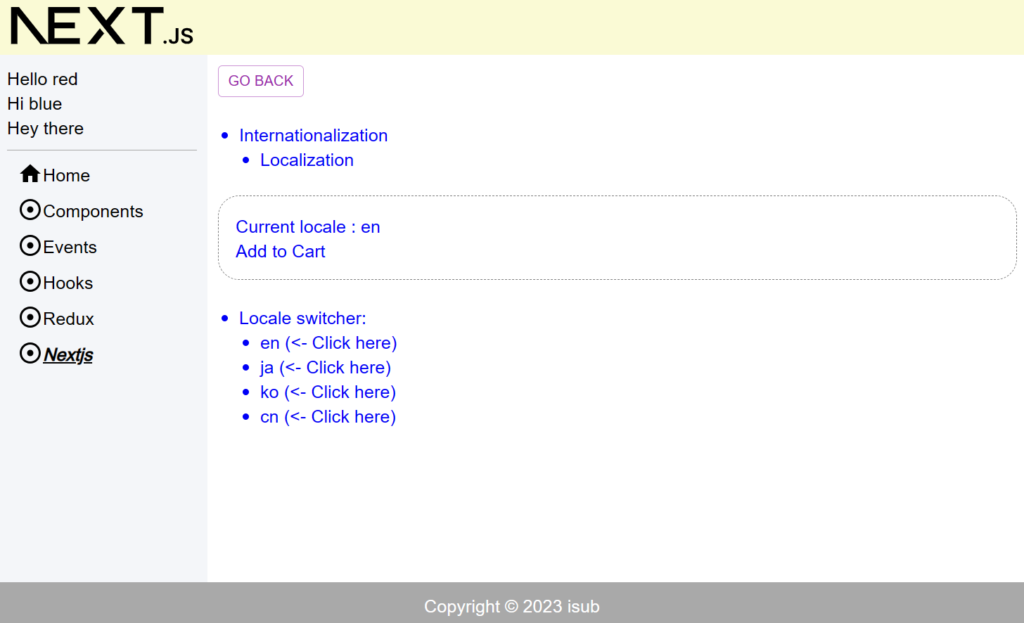
前回はServer Actionsの使い方についてでした。今回はLocalization(i18n)の使い方についてです。
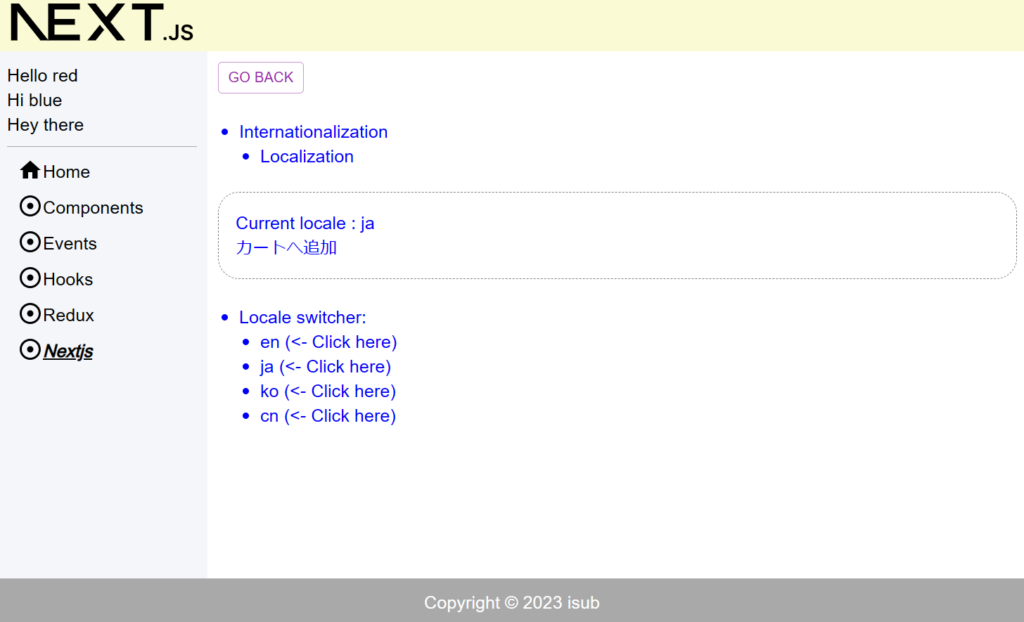
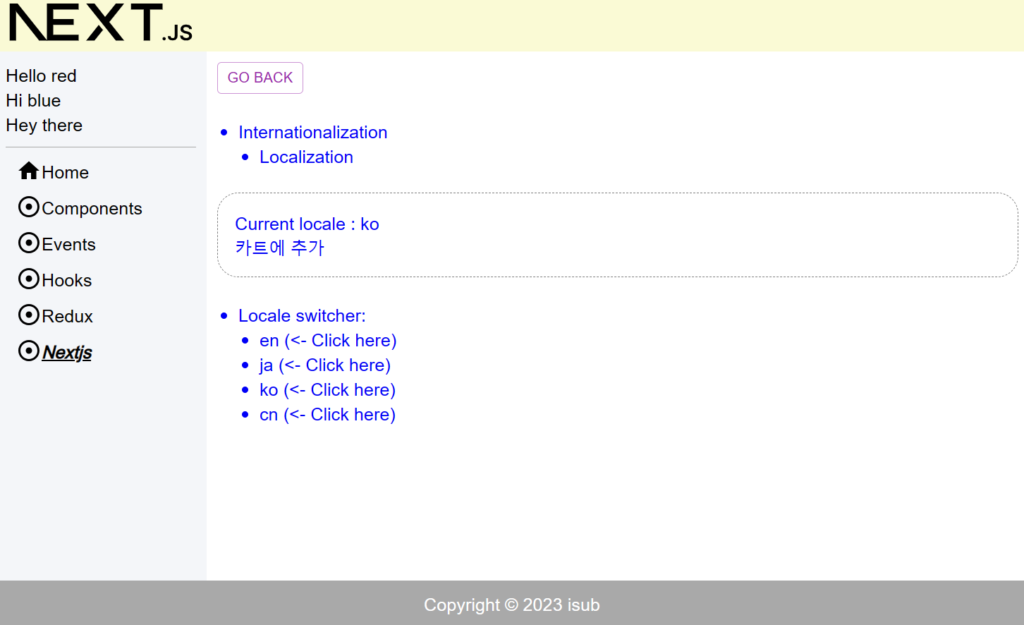
ユーザーが明示的に言語の切り替えをする内容となります。
- 英語
- 日本語
- 韓国語
- 中国語
対象としては開発を1年程やってて自分で最初から開発してみたい方になります。そのため細かい用語などの説明はしません。
2. nodeのインストール
こちらを参考
3. プロジェクトを作成
こちらを参考
4. 必要なライブラリをインストール
こちらを参考
5. ソースコード
※前回より差分のみを記載
5-1-1. src/lib/common/i18n/i18n-config.ts
export const i18n = {
  defaultLocale: "en",
  locales: ["en", "ja", "ko", "cn"],
} as const;

export type Locale = (typeof i18n)["locales"][number];
5-1-2. src/lib/common/i18n/dictionaries.ts
import type { Locale } from "./i18n-config";

const dictionaries = {
  en: () => import("./dictionaries/en.json").then((module) => module.default),
  ja: () => import("./dictionaries/ja.json").then((module) => module.default),
  ko: () => import("./dictionaries/ko.json").then((module) => module.default),
  cn: () => import("./dictionaries/cn.json").then((module) => module.default),
};

export const getDictionary = async (locale: Locale) =>
  dictionaries[locale]?.() ?? dictionaries.en();
5-1-3. src/lib/common/i18n/dictionaries/en.json
{
  "products": {
    "cart": "Add to Cart"
  }
}
5-1-4. src/lib/common/i18n/dictionaries/ja.json
{
  "products": {
    "cart": "カートへ追加"
  }
}
5-1-5. src/lib/common/i18n/dictionaries/ko.json
{
  "products": {
    "cart": "카트에 추가"
  }
}
5-1-6. src/lib/common/i18n/dictionaries/cn.json
{
  "products": {
    "cart": "加入购物车"
  }
}
5-1-7. src/app/nextjs/nextjs05/locale-switcher.tsx
import Link from "next/link";
import { Locale, i18n } from "@/lib/common/i18n/i18n-config";

const LocaleSwitcher = () => {
  return (
    <div>
      <ul>
        <li>Locale switcher:</li>
        <ul>
          {i18n.locales.map((locale: Locale) => {
            return (
              <li key={locale}>
                <Link href={`./nextjs05?lang=${locale}`}>
                  {locale} ({"<- Click here"})
                </Link>
              </li>
            );
          })}
        </ul>
      </ul>
    </div>
  );
};

export default LocaleSwitcher;
5-1-8. src/app/nextjs/nextjs05/metadata.ts
import { Metadata } from "next";

export const metadata: Metadata = {
  title: "i18n within app directory",
  description: "How to do i18n in Next.js 13 within app directory",
  robots: {
    index: false,
    follow: true,
    nocache: true,
    googleBot: {
      index: true,
      follow: false,
      noimageindex: true,
      "max-video-preview": -1,
      "max-image-preview": "large",
      "max-snippet": -1,
    },
  },
};
5-1-9. src/app/nextjs/nextjs05/page.module.scss
.component {
  color: blue;
  & ul {
    margin-left: 20px;
    & li {
      list-style: disc;
    }
  }
}
5-1-10. src/app/nextjs/nextjs05/page.tsx
import Box from "@mui/material/Box";

import scss from "./page.module.scss";
import GoBack from "@/lib/components/go-back";
import { getDictionary } from "@/lib/common/i18n/dictionaries";
import { Locale, i18n } from "@/lib/common/i18n/i18n-config";
import LocaleSwitcher from "./locale-switcher";
import { metadata } from "./metadata";

export { metadata };

const Nextjs05 = async ({
  searchParams,
}: {
  searchParams: { [key: string]: Locale };
}) => {
  const lang: Locale = searchParams.lang ?? i18n.defaultLocale;
  const dictionary = await getDictionary(lang);

  return (
    <div className={scss.component}>
      <GoBack />
      <br />
      <br />
      <ul>
        <li>Internationalization</li>
        <ul>
          <li>Localization</li>
        </ul>
      </ul>
      <br />
      <Box
        sx={{
          width: "100%",
          p: 2,
          border: "1px dashed grey",
          borderRadius: "20px",
          "&:hover": {
            backgroundColor: "pink",
            opacity: [0.9, 0.8, 0.7],
          },
        }}
      >
        Current locale : {lang}
        <br />
        {dictionary.products.cart}
      </Box>
      <br />
      <LocaleSwitcher />
    </div>
  );
};

export default Nextjs05;
5-1-11. src/app/nextjs/page.tsx
"use client";

import React from "react";
import { Link } from "@mui/material";
import scss from "./page.module.scss";

const Nextjs = () => {
  return (
    <div className={scss.components}>
      <ul>
        <li>
          <Link href="/nextjs/nextjs01" underline="hover">
            Nextjs01
          </Link>
        </li>
        <li>
          <Link href="/nextjs/nextjs02" underline="hover">
            Nextjs02
          </Link>
        </li>
        <li>
          <Link href="/nextjs/nextjs03" underline="hover">
            Nextjs03
          </Link>
        </li>
        <li>
          <Link href="/nextjs/nextjs04" underline="hover">
            Nextjs04
          </Link>
        </li>
        <li>
          <Link href="/nextjs/nextjs05" underline="hover">
            Nextjs05
          </Link>
        </li>
      </ul>
    </div>
  );
};

export default Nextjs;
6. サーバーを起動
npm run dev7. ブラウザで確認
- http://localhost:3000
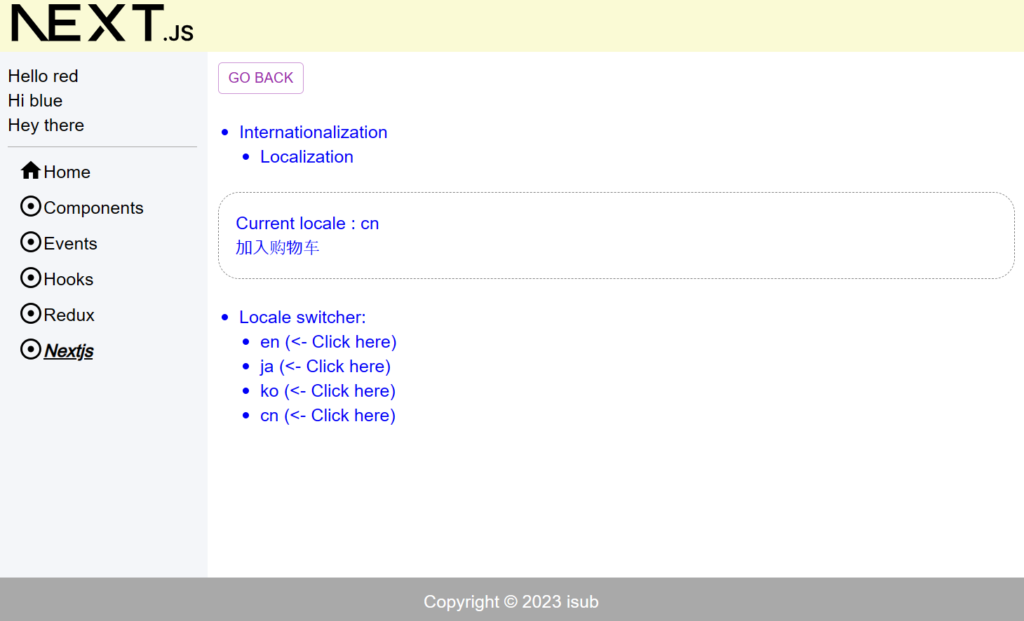
8. ディレクトリの構造
.
├── README.md
├── next-env.d.ts
├── next.config.js
├── package-lock.json
├── package.json
├── postcss.config.js
├── public
│   ├── js
│   │   └── script.js
│   ├── next.svg
│   └── vercel.svg
├── src
│   ├── app
│   │   ├── components
│   │   │   ├── component01
│   │   │   │   ├── page.module.scss
│   │   │   │   └── page.tsx
│   │   │   ├── component02
│   │   │   │   ├── page.module.scss
│   │   │   │   └── page.tsx
│   │   │   ├── component03
│   │   │   │   ├── page.module.scss
│   │   │   │   └── page.tsx
│   │   │   ├── component04
│   │   │   │   ├── checkbox-demo.tsx
│   │   │   │   ├── page.module.scss
│   │   │   │   ├── page.tsx
│   │   │   │   ├── radio-demo.tsx
│   │   │   │   └── select-demo.tsx
│   │   │   ├── page.module.scss
│   │   │   └── page.tsx
│   │   ├── events
│   │   │   ├── event01
│   │   │   │   ├── page.module.scss
│   │   │   │   └── page.tsx
│   │   │   ├── page.module.scss
│   │   │   └── page.tsx
│   │   ├── favicon.ico
│   │   ├── globals.css
│   │   ├── globals.scss
│   │   ├── hooks
│   │   │   ├── hook01
│   │   │   │   ├── page.module.scss
│   │   │   │   └── page.tsx
│   │   │   ├── hook02
│   │   │   │   ├── page.module.scss
│   │   │   │   └── page.tsx
│   │   │   ├── hook03
│   │   │   │   ├── child.tsx
│   │   │   │   ├── counter-provider.tsx
│   │   │   │   ├── grandchild.tsx
│   │   │   │   ├── myself.tsx
│   │   │   │   ├── page.module.scss
│   │   │   │   └── page.tsx
│   │   │   ├── hook04
│   │   │   │   ├── page.module.scss
│   │   │   │   └── page.tsx
│   │   │   ├── hook05
│   │   │   │   ├── child.tsx
│   │   │   │   ├── counter-provider.tsx
│   │   │   │   ├── grandchild.tsx
│   │   │   │   ├── myself.tsx
│   │   │   │   ├── page.module.scss
│   │   │   │   └── page.tsx
│   │   │   ├── hook06
│   │   │   │   ├── child.tsx
│   │   │   │   ├── page.module.scss
│   │   │   │   ├── page.tsx
│   │   │   │   ├── play-provider.tsx
│   │   │   │   ├── text-box.tsx
│   │   │   │   └── video-player.tsx
│   │   │   ├── page.module.scss
│   │   │   └── page.tsx
│   │   ├── layout.module.scss
│   │   ├── layout.tsx
│   │   ├── nextjs
│   │   │   ├── nextjs01
│   │   │   │   ├── child
│   │   │   │   │   ├── client-page.tsx
│   │   │   │   │   ├── metadata.ts
│   │   │   │   │   └── page.tsx
│   │   │   │   ├── page.module.scss
│   │   │   │   └── page.tsx
│   │   │   ├── nextjs02
│   │   │   │   ├── [...slug]
│   │   │   │   │   └── page.tsx
│   │   │   │   ├── page.module.scss
│   │   │   │   ├── page.tsx
│   │   │   │   └── shop
│   │   │   │       └── [id]
│   │   │   │           └── page.tsx
│   │   │   ├── nextjs03
│   │   │   │   ├── fetch-image.tsx
│   │   │   │   ├── get-image.tsx
│   │   │   │   ├── loading.tsx
│   │   │   │   ├── page.module.scss
│   │   │   │   └── page.tsx
│   │   │   ├── nextjs04
│   │   │   │   ├── actions.ts
│   │   │   │   ├── list.tsx
│   │   │   │   ├── page.module.scss
│   │   │   │   ├── page.tsx
│   │   │   │   └── register-form.tsx
│   │   │   ├── nextjs05
│   │   │   │   ├── locale-switcher.tsx
│   │   │   │   ├── metadata.ts
│   │   │   │   ├── page.module.scss
│   │   │   │   └── page.tsx
│   │   │   ├── page.module.scss
│   │   │   └── page.tsx
│   │   ├── page.module.scss
│   │   ├── page.tsx
│   │   └── redux
│   │       ├── page.module.scss
│   │       ├── page.tsx
│   │       ├── redux01
│   │       │   ├── child.tsx
│   │       │   ├── counter-slice.ts
│   │       │   ├── grandchild.tsx
│   │       │   ├── hooks.ts
│   │       │   ├── myself.tsx
│   │       │   ├── page.module.scss
│   │       │   ├── page.tsx
│   │       │   └── store.ts
│   │       └── redux02
│   │           ├── child.tsx
│   │           ├── hooks.ts
│   │           ├── image-box.tsx
│   │           ├── image-slice.ts
│   │           ├── page.module.scss
│   │           ├── page.tsx
│   │           ├── store.ts
│   │           ├── text-box.tsx
│   │           └── text-slice.ts
│   ├── lib
│   │   ├── common
│   │   │   ├── db
│   │   │   │   ├── pool-config.ts
│   │   │   │   └── pool.ts
│   │   │   ├── definitions.ts
│   │   │   ├── i18n
│   │   │   │   ├── dictionaries
│   │   │   │   │   ├── cn.json
│   │   │   │   │   ├── en.json
│   │   │   │   │   ├── ja.json
│   │   │   │   │   └── ko.json
│   │   │   │   ├── dictionaries.ts
│   │   │   │   └── i18n-config.ts
│   │   │   └── sidebar-links.tsx
│   │   ├── components
│   │   │   ├── alert-snackbar.tsx
│   │   │   ├── go-back.tsx
│   │   │   └── spacer.tsx
│   │   ├── footer.tsx
│   │   ├── header.tsx
│   │   ├── sidebar.tsx
│   │   └── utils
│   │       └── util.ts
│   └── scss
│       └── common
│           ├── _index.scss
│           ├── _mixin.scss
│           ├── _mq.scss
│           └── _variables.scss
├── tailwind.config.ts
└── tsconfig.json

40 directories, 126 files
9. 備考
今回はLocalization(i18n)の使い方についてでした。
10. 参考
- Docs | Next.js (nextjs.org)
- Quick Start – React
- Getting Started with Redux | Redux
- Getting Started with React Redux | React Redux (react-redux.js.org)
- Material UI: React components based on Material Design (mui.com)
投稿者プロフィール

-
開発好きなシステムエンジニアです。
卓球にハマってます。