

1. 概要
前回はuseEffectを使いコンポネントのレンダリングする内容についてでした。今回はReduxを使いコンポネント間で値を共有する内容となります。
対象としては開発を1年程やってて自分で最初から開発してみたい方になります。そのため細かい用語などの説明はしません。
2. nodeのインストール
こちらを参考
3. プロジェクトを作成
こちらを参考
4. 必要なライブラリをインストール
こちらを参考
npm install @reduxjs/toolkit react-redux5. ソースコード
※前回より差分のみを記載
5-1-1. src/app/redux/redux01/page.module.scss
.component {
  color: blue;
  & ul {
    margin-left: 20px;
    & li {
      list-style: disc;
    }
  }
}
5-1-2. src/app/redux/redux01/grandchild.tsx
import Box from "@mui/material/Box";
import { useCounterSelector } from "./hooks";

const Grandchild = () => {
  const count = useCounterSelector((state) => state.counter.count);

  return (
    <Box
      sx={{
        width: "100%",
        p: 2,
        border: "1px dashed grey",
        borderRadius: "20px",
        backgroundColor: "cyan",
        "&:hover": {
          backgroundColor: "white",
          opacity: [0.9, 0.8, 0.7],
        },
      }}
    >
      Grandchild({count})
    </Box>
  );
};

export default Grandchild;
5-1-3. src/app/redux/redux01/child.tsx
import Box from "@mui/material/Box";
import { useCounterSelector } from "./hooks";
import Grandchild from "./grandchild";

const Child = () => {
  const count = useCounterSelector((state) => state.counter.count);

  return (
    <Box
      sx={{
        width: "100%",
        p: 2,
        border: "1px dashed grey",
        borderRadius: "20px",
        backgroundColor: "yellow",
        "&:hover": {
          backgroundColor: "white",
          opacity: [0.9, 0.8, 0.7],
        },
      }}
    >
      Child({count})
      <Grandchild />
    </Box>
  );
};

export default Child;
5-1-4. src/app/redux/redux01/myself.tsx
import { Button, Stack } from "@mui/material";
import Box from "@mui/material/Box";
import scss from "./page.module.scss";
import GoBack from "@/lib/components/go-back";
import { useCounterSelector, useCounterDispatch } from "./hooks";
import { incrementByAmount, Action } from "./counter-slice";
import { AppDispatch } from "./store";
import Child from "./child";

const Myself = () => {
  const count = useCounterSelector((state) => state.counter.count);
  const dispatch: AppDispatch = useCounterDispatch();
  const countUpDown = (action: Action) => {
    dispatch(incrementByAmount(action));
  };

  return (
    <div className={scss.component}>
      <GoBack />
      <br />
      <br />
      <ul>
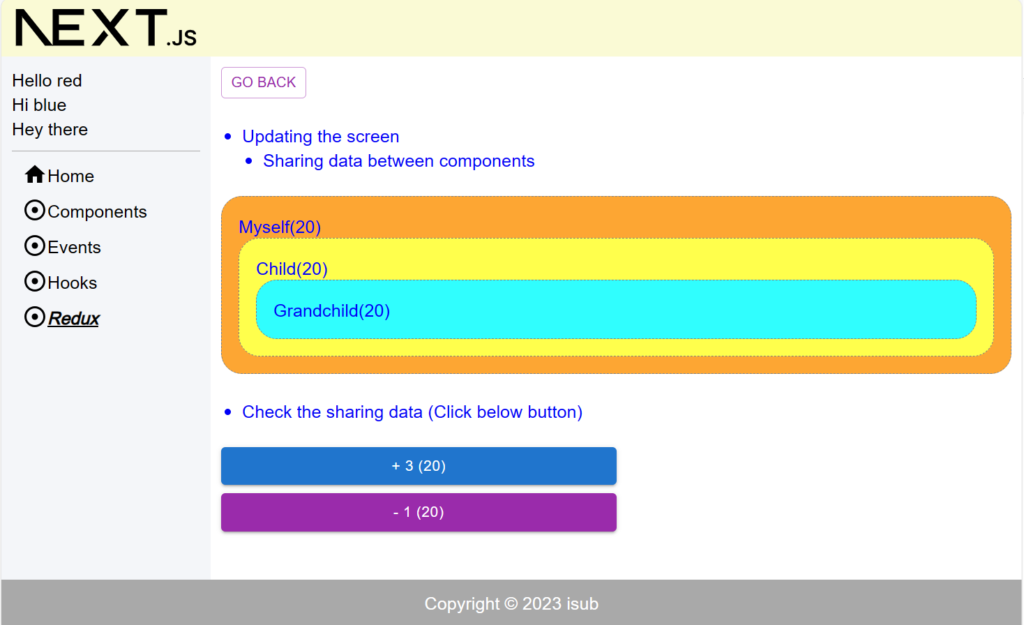
        <li>Updating the screen</li>
        <ul>
          <li>Sharing data between components</li>
        </ul>
      </ul>
      <br />
      <Box
        sx={{
          width: "100%",
          p: 2,
          border: "1px dashed grey",
          borderRadius: "20px",
          backgroundColor: "orange",
          "&:hover": {
            backgroundColor: "white",
            opacity: [0.9, 0.8, 0.7],
          },
        }}
      >
        Myself({count})
        <Child />
      </Box>
      <br />
      <ul>
        <li>Check the sharing data (Click below button)</li>
      </ul>
      <br />
      <Stack spacing={1} sx={{ width: "50%" }}>
        <Button
          variant="contained"
          size="medium"
          color="primary"
          onClick={() => countUpDown({ symbol: "+", step: 3 })}
        >
          + 3 ({count})
        </Button>
        <Button
          variant="contained"
          size="medium"
          color="secondary"
          onClick={() => countUpDown({ symbol: "-" })}
        >
          - 1 ({count})
        </Button>
      </Stack>
    </div>
  );
};

export default Myself;
5-1-5. src/app/redux/redux01/page.tsx
"use client";

import { Provider } from "react-redux";
import store from "./store";
import Myself from "./myself";

const Redux01 = () => {
  return (
    <Provider store={store}>
      <Myself />
    </Provider>
  );
};

export default Redux01;
5-1-6. src/app/redux/redux01/counter-slice.ts
import { createSlice, PayloadAction } from "@reduxjs/toolkit";
import type { RootState } from "./store";

export type Action = {
  symbol: string;
  step?: number;
};

type CounterState = {
  count: number;
};

const initialState: CounterState = {
  count: 0,
};

export const counterSlice = createSlice({
  name: "counter",
  initialState,
  reducers: {
    incrementByAmount: (state, action: PayloadAction<Action>) => {
      const { symbol, step = 1 } = action.payload;
      switch (symbol) {
        case "+":
          state.count += step;
          break;
        case "-":
          state.count -= step;
          break;
        default:
          state.count;
          break;
      }
    },
  },
});

export const { incrementByAmount } = counterSlice.actions;
export const selectCount = (state: RootState) => state.counter.count;
export default counterSlice.reducer;
5-1-7. src/app/redux/redux01/hooks.ts
import { TypedUseSelectorHook, useDispatch, useSelector } from "react-redux";
import type { RootState, AppDispatch } from "./store";

export const useCounterDispatch: () => AppDispatch = useDispatch;
export const useCounterSelector: TypedUseSelectorHook<RootState> = useSelector;
5-1-8. src/app/redux/redux01/store.ts
import { combineReducers, configureStore } from "@reduxjs/toolkit";
import counterSlice from "./counter-slice";

const reducers = combineReducers({
  counter: counterSlice,
});

const store = configureStore({
  reducer: reducers,
});

export type RootState = ReturnType<typeof store.getState>;
export type AppDispatch = typeof store.dispatch;

export default store;
5-1-9. src/app/redux/page.module.scss
.components {
  color: blue;
  & ul {
    margin-left: 20px;
    & li {
      list-style: disc;
    }
  }
}
5-1-10. src/app/redux/page.tsx
"use client";

import React from "react";
import { Link } from "@mui/material";

import scss from "./page.module.scss";

const Redux = () => {
  return (
    <div className={scss.components}>
      <ul>
        <li>
          <Link href="/redux/redux01" underline="hover">
            Redux01
          </Link>
        </li>
      </ul>
    </div>
  );
};

export default Redux;
5-1-11. src/lib/common/sidebar-links.tsx
import HomeIcon from "@mui/icons-material/Home";
import AdjustIcon from "@mui/icons-material/Adjust";

import { SidebarLinkType } from "./definitions";

const sidebarHome: SidebarLinkType = {
  label: "Home",
  path: "/",
  icon: <HomeIcon />,
  targetSegment: null,
};
const sidebarComponents: SidebarLinkType = {
  label: "Components",
  path: "/components",
  icon: <AdjustIcon />,
  targetSegment: "components",
};
const sidebarEvents: SidebarLinkType = {
  label: "Events",
  path: "/events",
  icon: <AdjustIcon />,
  targetSegment: "events",
};
const sidebarHooks: SidebarLinkType = {
  label: "Hooks",
  path: "/hooks",
  icon: <AdjustIcon />,
  targetSegment: "hooks",
};
const sidebarRedux: SidebarLinkType = {
  label: "Redux",
  path: "/redux",
  icon: <AdjustIcon />,
  targetSegment: "redux",
};
export const sidebarLinks: SidebarLinkType[] = [
  sidebarHome,
  sidebarComponents,
  sidebarEvents,
  sidebarHooks,
  sidebarRedux,
];
6. サーバーを起動
npm run dev7. ブラウザで確認
- http://localhost:3000
8. ディレクトリの構造
.
├── README.md
├── next-env.d.ts
├── next.config.js
├── package-lock.json
├── package.json
├── postcss.config.js
├── public
│   ├── next.svg
│   └── vercel.svg
├── src
│   ├── app
│   │   ├── components
│   │   │   ├── component01
│   │   │   │   ├── page.module.scss
│   │   │   │   └── page.tsx
│   │   │   ├── component02
│   │   │   │   ├── page.module.scss
│   │   │   │   └── page.tsx
│   │   │   ├── component03
│   │   │   │   ├── page.module.scss
│   │   │   │   └── page.tsx
│   │   │   ├── component04
│   │   │   │   ├── checkbox-demo.tsx
│   │   │   │   ├── page.module.scss
│   │   │   │   ├── page.tsx
│   │   │   │   ├── radio-demo.tsx
│   │   │   │   └── select-demo.tsx
│   │   │   ├── page.module.scss
│   │   │   └── page.tsx
│   │   ├── events
│   │   │   ├── event01
│   │   │   │   ├── page.module.scss
│   │   │   │   └── page.tsx
│   │   │   ├── page.module.scss
│   │   │   └── page.tsx
│   │   ├── favicon.ico
│   │   ├── globals.css
│   │   ├── globals.scss
│   │   ├── hooks
│   │   │   ├── hook01
│   │   │   │   ├── page.module.scss
│   │   │   │   └── page.tsx
│   │   │   ├── hook02
│   │   │   │   ├── page.module.scss
│   │   │   │   └── page.tsx
│   │   │   ├── hook03
│   │   │   │   ├── child.tsx
│   │   │   │   ├── counter-provider.tsx
│   │   │   │   ├── grandchild.tsx
│   │   │   │   ├── myself.tsx
│   │   │   │   ├── page.module.scss
│   │   │   │   └── page.tsx
│   │   │   ├── hook04
│   │   │   │   ├── page.module.scss
│   │   │   │   └── page.tsx
│   │   │   ├── hook05
│   │   │   │   ├── child.tsx
│   │   │   │   ├── counter-provider.tsx
│   │   │   │   ├── grandchild.tsx
│   │   │   │   ├── myself.tsx
│   │   │   │   ├── page.module.scss
│   │   │   │   └── page.tsx
│   │   │   ├── hook06
│   │   │   │   ├── child.tsx
│   │   │   │   ├── page.module.scss
│   │   │   │   ├── page.tsx
│   │   │   │   ├── play-provider.tsx
│   │   │   │   ├── text-box.tsx
│   │   │   │   └── video-player.tsx
│   │   │   ├── page.module.scss
│   │   │   └── page.tsx
│   │   ├── layout.module.scss
│   │   ├── layout.tsx
│   │   ├── page.module.scss
│   │   ├── page.tsx
│   │   └── redux
│   │       ├── page.module.scss
│   │       ├── page.tsx
│   │       └── redux01
│   │           ├── child.tsx
│   │           ├── counter-slice.ts
│   │           ├── grandchild.tsx
│   │           ├── hooks.ts
│   │           ├── myself.tsx
│   │           ├── page.module.scss
│   │           ├── page.tsx
│   │           └── store.ts
│   ├── lib
│   │   ├── common
│   │   │   ├── definitions.ts
│   │   │   └── sidebar-links.tsx
│   │   ├── components
│   │   │   ├── alert-snackbar.tsx
│   │   │   ├── go-back.tsx
│   │   │   └── spacer.tsx
│   │   ├── footer.tsx
│   │   ├── header.tsx
│   │   ├── sidebar.tsx
│   │   └── utils
│   │       └── util.ts
│   └── scss
│       └── common
│           ├── _index.scss
│           ├── _mixin.scss
│           ├── _mq.scss
│           └── _variables.scss
├── tailwind.config.ts
└── tsconfig.json

25 directories, 83 files
9. 備考
今回はReduxを使いコンポネント間で値を共有する内容でした。

10. 参考
- Docs | Next.js (nextjs.org)
- Quick Start – React
- Getting Started with Redux | Redux
- Getting Started with React Redux | React Redux (react-redux.js.org)
- Material UI: React components based on Material Design (mui.com)
投稿者プロフィール

-
開発好きなシステムエンジニアです。
卓球にハマってます。